Usage
DocFinder provides a desktop GUI and a web interface.
Desktop GUI
Launch the native desktop application:
make run
The GUI provides:
- Document browser and indexer
- Semantic search bar with relevance results
- AI chat panel for asking questions about your documents
- Global shortcut hotkey support
Indexing Documents
Open the application and use the built-in file browser to select documents or folders. DocFinder will automatically discover all supported files and index them.
Searching
Type your query in the search bar. Results are ranked by semantic relevance and displayed with page numbers and document titles.
Global Hotkey
The global shortcut (configurable in Settings) lets you bring DocFinder to the front from anywhere. The default hotkey is <alt>+d on all platforms.
Models & Ollama (Settings)
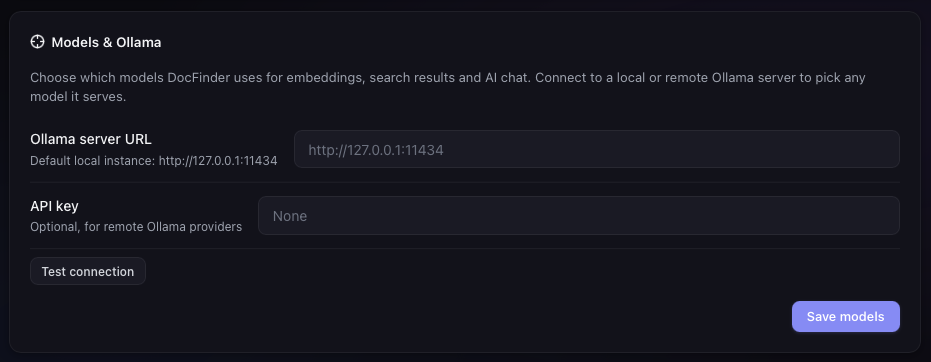
The Models & Ollama card in Settings lets you replace the built-in models with ones served by an Ollama server:
- Enter the Ollama server URL (e.g.
http://127.0.0.1:11434) and, for remote providers, an optional API key - Click Test connection — a badge shows whether the server is reachable and how many models are installed
- Pick the embedding model and the chat model from the lists of installed models
- Click Save models
Changing the embedding model invalidates the existing index: a warning banner appears with a Re-index now button that clears and re-indexes the previously indexed folders automatically. Changing the chat model applies immediately. The server can be local or remote (VPS/Ollama provider).
Indexed Library (Documents tab)
The Documents tab lists everything that has been indexed, with document and chunk counts. Use the Filter dropdown to show All documents, only 100% privacy ones (those with the shield badge), or only documents without the privacy flag. Two buttons sit in the card header:
- Clean up — removes from the index every document whose file no longer exists on disk (e.g. you deleted or moved it)
- Refresh — reloads the list from the index; use it after external changes or to update counts.
100% Privacy Mode
The Index tab has a 100% privacy checkbox. When checked, the indexed files are marked in the
database with a privacy flag: indexing requires a local embedding model, and AI chat on those
documents refuses remote LLMs (Ollama on localhost is allowed — data never leaves your
machine). Privacy-marked documents show a shield badge in the Documents tab, and re-indexing
preserves the flag.

Web Interface
Launch the web interface:
make run-web
Open http://127.0.0.1:8000 in your browser.
The web UI mirrors the desktop GUI features. By default it listens on 127.0.0.1 (local only); start it with docfinder web --host 0.0.0.0 to access it from other devices on your network.